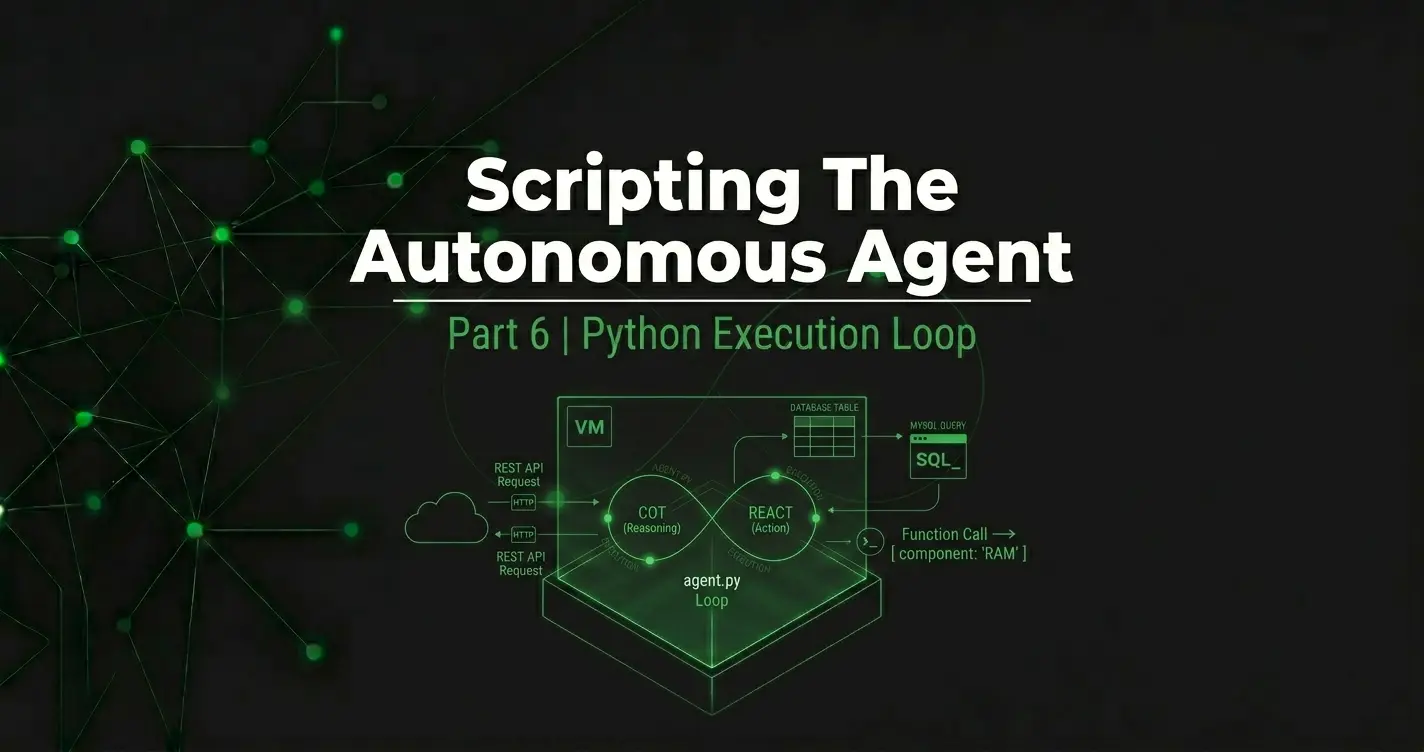
In this chapter, we enter the realm of pure programming and software engineering. We learn how to write the central execution script in Python, how to integrate a secure connection through HTTP REST requests to the Gemini API to handle function calls natively, and how to close the autonomous loop so that the local Agent can query the database based on decisions received from the AI, securely and without human intervention.
“We have built the walls of our local factory: the virtual machine is running in Proxmox, the MariaDB server is active, and environment variables protect our access keys. Now it is time to bring the worker onto the platform: we write the Python script that starts the first loop of genuine autonomy.”
Welcome to the technical heart of our project. So far, we have prepared the communication channels; today, we write the execution logic that transforms a language model from a simple chatbot into a decision-making Agent capable of interacting with the real world.
🔹 Preparing the Local Working Environment (Virtualenv)
A golden rule in Python is never to install packages directly into the global operating system environment, so as not to interfere with Linux dependencies. For this reason, inside our virtual machine, we will create an isolated working environment (Virtual Environment).
Connect to your server via SSH, create a dedicated project directory, and configure the workspace by running the commands step by step, on separate lines:
# 1. Create the project directory and enter it
mkdir -p ~/warehouse_agent && cd ~/warehouse_agent

# 2. Create the isolated virtual environment
python3 -m venv venv

# 3. Activate the isolated environment
source venv/bin/activate

# 4. Install the two essential libraries for our Agent
pip install requests mysql-connector-python
🔹 Writing Flexible Tools (SQL Connection in Python)
For the Agent to read stock levels from our inventory database, we need to write a clean Python function. To avoid issues when users submit irrelevant words or plural forms, the script will split the text into keywords and generate a tolerant, dynamic search.
Make sure you are in the project directory (cd ~/warehouse_agent). Open the main file using the text editor: nano agent.py and enter the code responsible for the SQL infrastructure:
import os
import mysql.connector
import requests

# 1. Define the flexible local function that queries the native database
def check_hardware_stock(component: str) -> str:
    try:
        # Open the localhost connection using the credentials from the system
        connection = mysql.connector.connect(
            host="127.0.0.1",
            user="agent_user",
            password=os.environ.get("DB_PASSWORD"),
            database="agent_warehouse"
        )
        cursor = connection.cursor()

        # Split the string into individual words (e.g. "module RAM" -> ['module', 'ram'])
        words = component.lower().strip().split()

        # Remove common plural suffixes to make the search more flexible
        cleaned_words = []
        for word in words:
            if len(word) > 3:
                if word.endswith('uri'): word = word[:-3]
                elif word.endswith('ele'): word = word[:-3]
                elif word.endswith('e') or word.endswith('i') or word.endswith('s'): word = word[:-1]
            cleaned_words.append(word)

        # Dynamically generate SQL OR conditions for each keyword
        conditions = " OR ".join(["LOWER(component_name) LIKE %s" for _ in cleaned_words])
        query = f"SELECT component_name, specs, stock_count FROM hardware_inventory WHERE {conditions}"
        params = [f"%{c}%" for c in cleaned_words]

        cursor.execute(query, params)
        result = cursor.fetchone()

        cursor.close()
        connection.close()

        if result:
            return f"Local Result: Component '{result[0]}' ({result[1]}) currently has {result[2]} units in stock."
        else:
            return f"Local Result: No matching component for '{component}' was found in the database."

    except Exception as e:
        return f"Local SQL Error: {str(e)}"
🔹Connecting the Brain and the Function Calling Loop
To understand the Function Calling mechanism and the exact structure of the messages exchanged with the model, we will communicate directly with the Gemini API using the HTTP REST protocol. In this project, we use direct REST calls to the Gemini API, giving us complete control over the payload and reducing our dependence on SDK versions. In addition, this approach allows us to clearly observe every stage of the conversation between the local application and the AI model, without additional layers of abstraction.
Continue in the same agent.py file by adding the central control logic for the unified loop and the REST client responsible for sending parameters to the Cloud:
# 2. REST client for Gemini (Natively compatible with the new security keys)
class RESTGeminiClient:
    def __init__(self):
        self.api_key = os.environ.get("API_KEY")
        self.url = f"https://generativelanguage.googleapis.com/v1beta/models/gemini-2.5-flash:generateContent?key={self.api_key}"
        self.headers = {"Content-Type": "application/json"}
        self.history = []

        self.system_instruction = (
            "You are a precise warehouse manager. Your exclusive role is to answer questions related to hardware inventory "
            "using the check_hardware_stock tool. If the user asks you questions outside this domain, "
            "such as general knowledge, history, or capital cities, politely refuse to answer, explaining that you can only check component inventory."
        )

        # Declare the signature of our local function so that the Cloud model can understand it
        self.tools = [{
            "function_declarations": [{
                "name": "check_hardware_stock",
                "description": "Checks the available warehouse stock for a specific hardware component.",
                "parameters": {
                    "type": "OBJECT",
                    "properties": {
                        "component": {
                            "type": "STRING",
                            "description": "The name of the hardware component to search for."
                        }
                    },
                    "required": ["component"]
                }
            }]
        }]

    def send_message(self, user_text: str, function_response=None):
        if function_response:
            self.history.append({
                "role": "function",
                "parts": [{
                    "functionResponse": {
                        "name": "check_hardware_stock",
                        "response": {"result": function_response}
                    }
                }]
            })
        else:
            self.history.append({
                "role": "user",
                "parts": [{"text": user_text}]
            })

        payload = {
            "contents": self.history,
            "tools": self.tools,
            "systemInstruction": {"parts": [{"text": self.system_instruction}]}
        }

        http_response = requests.post(self.url, headers=self.headers, json=payload)
        if http_response.status_code != 200:
            raise Exception(f"{http_response.status_code} {http_response.text}")

        json_data = http_response.json()
        response_part = json_data.get("candidates", [{}])[0].get("content", {}).get("parts", [{}])[0]

        self.history.append({
            "role": "model",
            "parts": [response_part]
        })
        return response_part

def run_agent(user_question: str, agent_client: RESTGeminiClient):
    print(f"\n[User]: {user_question}")
    print("[System]: Sending context to the Cloud...")

    try:
        response_part = agent_client.send_message(user_text=user_question)

        # Check whether the AI model has issued a request to run our local SQL function
        if "functionCall" in response_part:
            function_call = response_part["functionCall"]
            function_name = function_call.get("name")
            arguments = function_call.get("args", {})

            if function_name == "check_hardware_stock":
                component_filter = arguments.get("component", "")
                local_db_result = check_hardware_stock(component=component_filter)
                print(f"[System]: Executing local function -> {local_db_result}")

                # Send the database result back to the Cloud so it can formulate the final sentence
                final_response = agent_client.send_message(user_text="", function_response=local_db_result)
                print(f"[Autonomous Agent]: {final_response.get('text')}\n")
        else:
            print(f"[Autonomous Agent]: {response_part.get('text')}\n")

    except Exception as e:
        print(f"[API Error]: {str(e)}\n")

# 3. Entry point for our production test
if __name__ == "__main__":
    agent = RESTGeminiClient()

    # Test the Agent's discernment and execution capabilities
    run_agent("Do we still have RAM modules in stock?", agent)
    run_agent("How many Intel NUC motherboards are still in stock?", agent)
    run_agent("What is the capital of France?", agent) # A test that will hit the safety barrier (Guardrail)
Save and close the file (press CTRL+X, then Y and Enter).
⚠️ Addendum – September 2026 Update
Google has since evolved the Gemini API and the way the Function Calling mechanism is documented. The code presented above is the version used and tested in the original lab, using direct HTTP REST calls to the Generate Content API.
In the current documentation, Google continues to support the Function Calling mechanism. However, the recommended format for returning a function’s result uses a functionResponse associated with the function call and, in current examples, is sent in the conversation history with the user role. Our code uses the REST format that was tested when the lab was originally created.
Important: this evolution does not change the architecture demonstrated here. The flow remains the same: the model generates a functionCall, the local application executes the function, and the result is sent back to the model so it can formulate the final response.
There is also an important change regarding authentication. In 2026, Google is transitioning from Standard API Keys to Authorization (Auth) Keys. Starting May 28, 2026, new API keys created in Google AI Studio are automatically generated as Auth Keys, and Google has announced that requests originating from Standard API Keys will be rejected in September 2026.
The current documentation also recommends sending the API key through the HTTP header x-goog-api-key, rather than including it in the URL through the ?key= parameter, as the original lab code does. This recommendation concerns the method of transmitting the key, not the logic of the API call.
Therefore, if you are reproducing this lab today, use a key compatible with the current authentication mechanism and the transmission method recommended by Google. The original code is retained as documentation of the tested experiment, not as a recommendation for a new implementation.
⚠️ Production Note
For educational simplicity, the example uses fetchone() and a simplified word normalization logic. In a real-world system, it is recommended to handle multiple results, perform additional input validation, and implement more robust search mechanisms adapted to the database structure and application requirements.
🔹The Anatomy of an Autonomous Decision (What Happens Behind the Scenes)
Before pressing Enter to run the script, it is time to open the black box and understand the hidden choreography behind the code. Many people believe that AI reads the database directly from Proxmox, but the reality is far more intelligent and secure.
Here are the 4 hidden stages executed with every question:
- Context Evaluation in the Cloud: When you send the text “Do we still have RAM modules in stock?”, it reaches Google Gemini’s servers along with your Python function’s “contract”. The model analyzes the intent and examines the system instruction. It understands that the user is asking about stock levels and that it has a tool called
check_hardware_stockavailable, which accepts an argument namedcomponent. - Argument Generation and Function Call Request (Function Calling): The AI model does NOT return a direct text response to the user. Instead, it generates a structured function call request containing the function name and the required arguments, for example:
{"name": "check_hardware_stock", "args": {"component": "RAM module"}}. The Agent has independently inferred what information needs to be passed to the local function so that it can perform the search. - Rigid Local Execution on Localhost: The local Python script intercepts this structured request received from the Cloud, temporarily pauses the conversation, and runs your function on the virtual machine. The script retrieves the received value, splits it into words, removes plural suffixes, opens the connection to MariaDB through localhost, and executes the parameterized query with wildcards. The database returns the actual inventory record.
- Final Response Synthesis: The Python script takes the result of the local function and sends it back to the Cloud in a second API call. Gemini reads the actual data returned by your virtual machine and, using its natural language capabilities, formulates the final sentence you see on the screen.
🔹Running the Sequential Test
This is the moment of truth. With the virtual environment active and the variables loaded into the session, run the script directly in your server terminal:
python agent.pyPay close attention to what happens in the console. The first two stock queries will retrieve data from the MariaDB tables on localhost. With the third question (“What is the capital of France?”), you will see our logic being put to the test: the Agent should politely refuse to answer, in accordance with the system instruction, demonstrating that the safety barrier (Guardrail) is working.
🔹The Evolution into a Continuous Interactive Chatbot
The linear test proved that the Agent knows how to retrieve data, but for real-world use in a company, we need a fluid conversation. The AI must wait for new commands and, very importantly, retain the context of the previous discussion (context persistence).
To achieve this, we will create a new file: nano chat_agent.py and wrap the REST logic from earlier in an infinite while True loop. This script will turn our terminal into a live chat window:
import os
import mysql.connector
import requests

# 1. The local SQL function remains with English variables
def check_hardware_stock(component: str) -> str:
    try:
        connection = mysql.connector.connect(
            host="127.0.0.1", user="agent_user", password=os.environ.get("DB_PASSWORD"), database="agent_warehouse"
        )
        cursor = connection.cursor()
        words = component.lower().strip().split()
        cleaned_words = [w[:-3] if w.endswith('uri') or w.endswith('ele') else w[:-1] if w.endswith('e') or w.endswith('i') or w.endswith('s') else w for w in words if len(w) > 3]

        conditions = " OR ".join(["LOWER(component_name) LIKE %s" for _ in cleaned_words])
        query = f"SELECT component_name, specs, stock_count FROM hardware_inventory WHERE {conditions}"
        params = [f"%{c}%" for c in cleaned_words]

        cursor.execute(query, params)
        result = cursor.fetchone()
        cursor.close()
        connection.close()

        if result: return f"Local Result: Component '{result[0]}' ({result[1]}) currently has {result[2]} units in stock."
        else: return f"Local Result: No matching component for '{component}' was found in the database."
    except Exception as e:
        return f"Local SQL Error: {str(e)}"

# 2. REST client for Interactive Chat
class RESTGeminiChatSession:
    def __init__(self):
        self.api_key = os.environ.get("API_KEY")
        self.url = f"https://generativelanguage.googleapis.com/v1beta/models/gemini-2.5-flash:generateContent?key={self.api_key}"
        self.headers = {"Content-Type": "application/json"}
        self.history = [] # Conversation memory is stored here

        self.system_instruction = "You are a precise warehouse manager. Your exclusive role is to answer questions related to hardware inventory using the check_hardware_stock tool. If the user asks you questions outside this domain, politely refuse to answer."
        self.tools = [{"function_declarations": [{"name": "check_hardware_stock", "description": "Checks the available warehouse stock for a specific hardware component.", "parameters": {"type": "OBJECT", "properties": {"component": {"type": "STRING", "description": "The name of the hardware component to search for."}}, "required": ["component"]}}]}]

    def send_message(self, user_text: str, function_response=None):
        if function_response:
            self.history.append({"role": "function", "parts": [{"functionResponse": {"name": "check_hardware_stock", "response": {"result": function_response}}}]})
        else:
            self.history.append({"role": "user", "parts": [{"text": user_text}]})

        payload = {"contents": self.history, "tools": self.tools, "systemInstruction": {"parts": [{"text": self.system_instruction}]}}
        http_response = requests.post(self.url, headers=self.headers, json=payload)

        if http_response.status_code != 200: raise Exception(f"{http_response.status_code} {http_response.text}")
        response_part = http_response.json().get("candidates", [{}])[0].get("content", {}).get("parts", [{}])[0]

        self.history.append({"role": "model", "parts": [response_part]})
        return response_part

# 3. The infinite loop that keeps the chat active in the terminal
if __name__ == "__main__":
    print("[System]: Initializing the live REST chat session with the Agent...")
    chat = RESTGeminiChatSession()
    print("\n=== Hardware Inventory Chatbot Active ===")
    print("Type your question below. Type 'exit' or 'quit' to close.\n")

    while True:
        try:
            user_input = input("[User]: ")
            if user_input.lower() in ['exit', 'quit']:
                print("[System]: Session closed. Goodbye!")
                break
            if not user_input.strip(): continue

            print("[System]: Sending message to the Cloud...")
            response_part = chat.send_message(user_text=user_input)

            if "functionCall" in response_part:
                function_call = response_part["functionCall"]
                if function_call.get("name") == "check_hardware_stock":
                    local_db_result = check_hardware_stock(component=function_call.get("args", {}).get("component", ""))
                    print(f"[System]: Executing local function -> {local_db_result}")
                    final_response = chat.send_message(user_text="", function_response=local_db_result)
                    print(f"[Autonomous Agent]: {final_response.get('text')}\n")
            else:
                print(f"[Autonomous Agent]: {response_part.get('text')}\n")
        except Exception as e:
            print(f"[API Error]: {str(e)}\n")
Now run python chat_agent.py in the terminal. Your terminal has become a live prompt. You can ask a series of related questions (“Do we still have RAM?”, followed by “What about SSDs?”), and the Agent will retain the thread of the conversation because the script stores the conversation history and resends it to Gemini with every new API call, transparently querying the database whenever it needs the actual figures. To close the program, simply type exit.
🛠️ What’s Next in Episode 7? Our worker has entered the factory: the Python script runs perfectly, communicates with MariaDB over localhost, and intelligently translates human requests into SQL inventory queries. In the next episode, we will look beyond the console to understand the bigger picture. We will analyze how the Function Calling architecture we have built complements RAG (Retrieval-Augmented Generation) systems, and learn how to choose the right technology based on the nature of our data to ensure maximum efficiency in production!
Your local infrastructure has been successfully brought to life. The Function Calling loop has been completed natively, both for sequential commands and for live chat.
Stay Free! Stay Hidden! Stay Autonomous!
⚙️ Appendix: AI Engineering Micro-Course (Technical Clarifications)
- Python Virtual Environment (venv): A tool that creates an isolated directory containing its own Python executables and libraries, preventing conflicts between packages used by different local projects.
- SQL Parameterization: A programming technique in which variables in an SQL command are passed separately to the database server (using placeholders such as
%s), reducing the risk of SQL Injection attacks by treating the supplied values as data rather than as part of the SQL instruction. - REST HTTP API Communication: A universal method of communicating with language models through standard HTTP requests sent directly to Google’s API endpoints, reducing dependency on SDKs or intermediary software packages.
- System Instruction & Guardrails: A set of behavioral rules provided in an LLM’s configuration to define its role and operational boundaries, guiding the Agent to refuse executions or responses outside its established scope of work (Out of Scope).